In today’s world, our smartphones have become so important. We depend on them whether we like it or not. Especially as the trend moves further toward digitalization.
I’ve worked in IT for more than 10 years and have probably supported thousands (exaggerated) of end users. Not excluding the end users in my very own home, who keep reminding me that I really should post this article.
I sometimes wonder if users are ready to lose their smartphone. There’s a sentence I keep hearing in Swiss German: “Wenn ich mis Handy verlüre. Was machi? Ich bi ufgschmisse!”
In English: “I’m lost when I lose my phone.”
Goal
I want to share my knowledge on how to secure your email accounts and maintain access to them, even if your smartphone is lost, stolen, or broken.
Strategies for Having Multiple Accounts
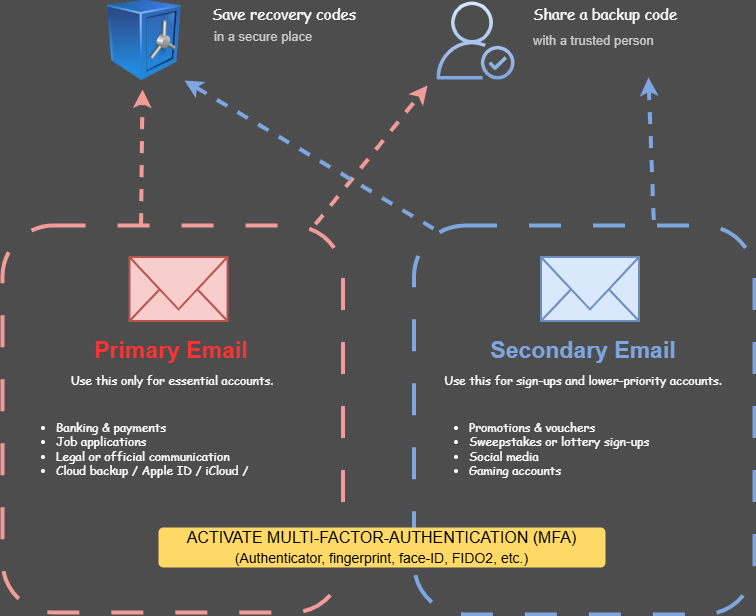
I strongly advise people to have at least two email accounts. On both accounts, generate recovery codes and store them in a secure place. Share a backup code with a trusted person. This is especially useful when you are not near your safe but can still reach that person.
Primary Email
This is the account you want to protect from adversaries (hackers), because this is the email address you use for important correspondence, like emailing your lawyer because your neighbor won’t comply with quiet hours (Ruhezeit).
Use this for:
- Banking & payments
- Job applications
- Legal or official communication
- Cloud backup / Apple ID / iCloud
Secondary Email
This is the account you mainly use for sweepstakes, newsletters, and logging into auction sites.
Use this for:
- Promotions & vouchers
- Sweepstakes or lottery sign-ups
- Social media
- Gaming accounts
Activate Multi-Factor Authentication (MFA)
Activate MFA on both accounts. Options include Google Authenticator, fingerprint, Face ID, or FIDO2. This list is not exhaustive.
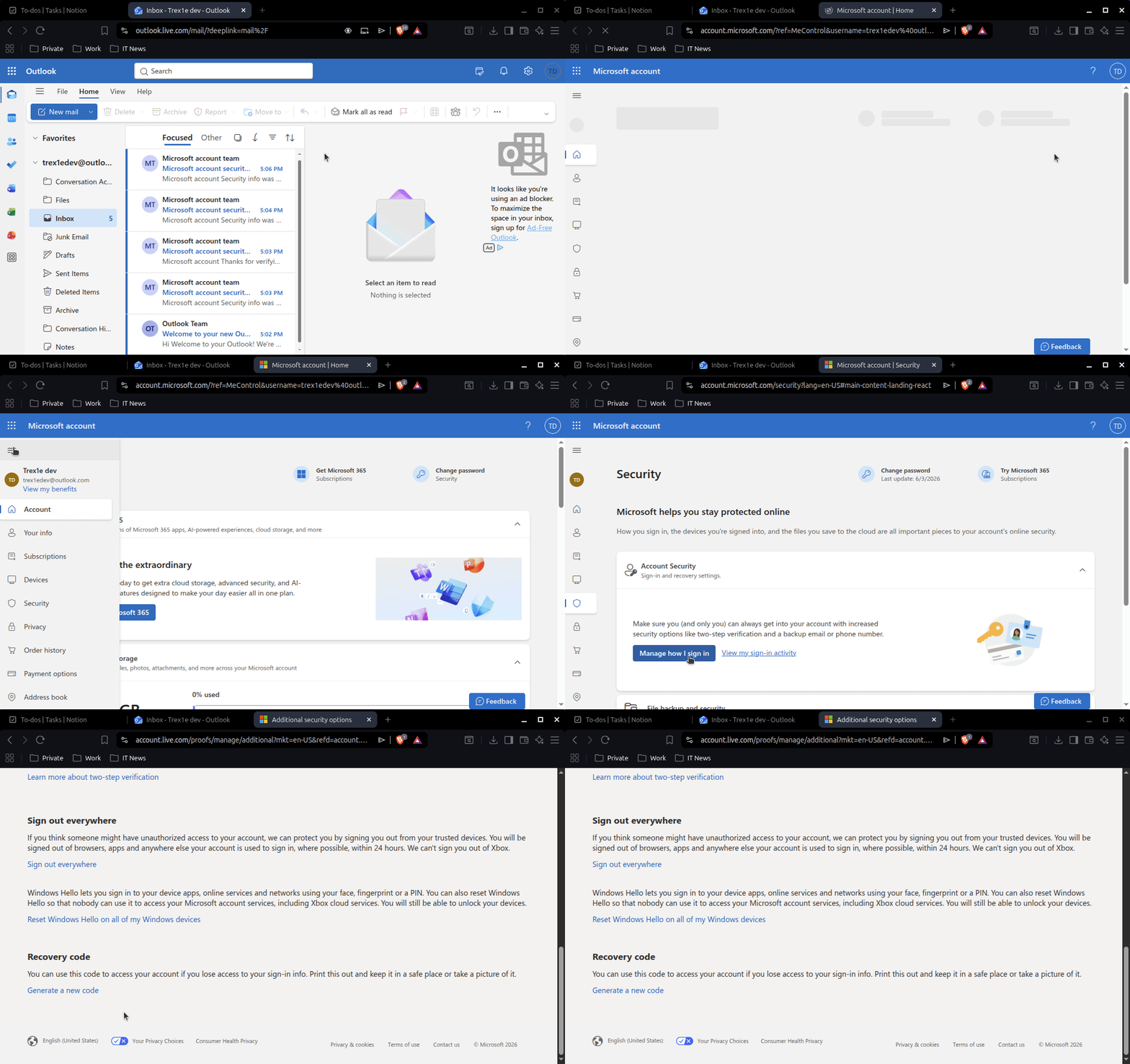
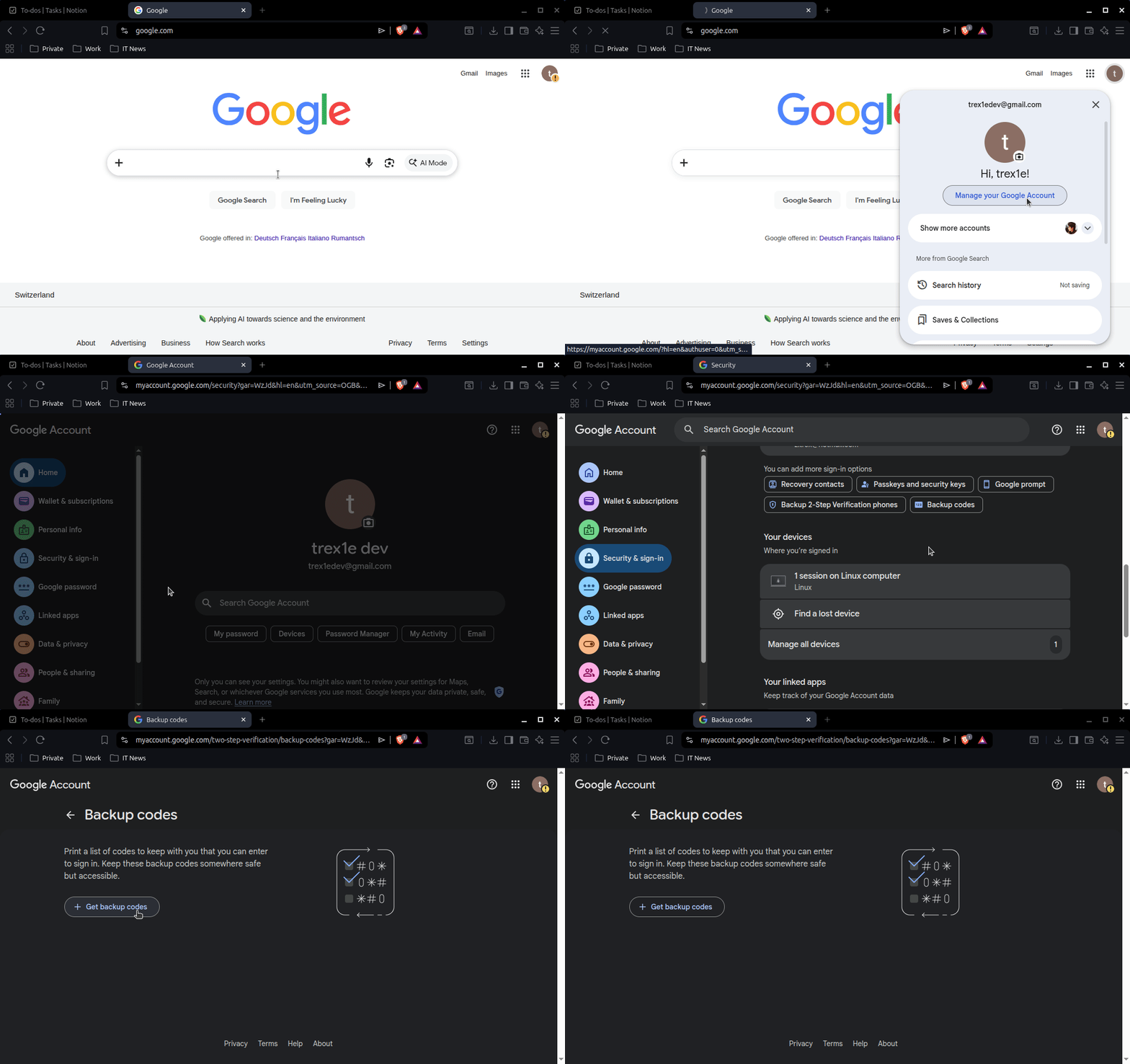
Generating Recovery Keys
Outlook
Use a Password Manager
There are many password managers available. Here are my recommendations:
- 1Password (okay, this one is paid but worth it)
- Bitwarden
- NordPass
- Proton Pass
Regular Backup on Your Smartphone
Perform regular backups on your smartphone, whether on iCloud, Google Drive, or your preferred service. Set it to automatic so it runs on its own.
Other Tips
- Write down the phone numbers of your trusted contacts. Just in case you’re on an island and a monkey stole your smartphone.
- Don’t click on links from untrusted emails. Phishing emails are everywhere.
- Create a password that has nothing to do with your identity, your partner, your pet, or your hobbies. Don’t use your child’s name either. Use your password manager to generate one or try a passphrase like Powder-Lettuce-Whole-Cup$!
What if someone steals your phone and already has access to your email?
This nightmare scenario scares me too, not just you. The solution here is a YubiKey, a physical hardware key that means you are no longer dependent on your smartphone for authentication. That said, it comes with its own challenge: what if you are forgetful and misplace it?
Google “YubiKey” for more information. 🙂
Conclusion
This advice is nowhere near complete, but I believe that if you do these things, you can sleep better at night and let the monkey play with your smartphone. 🙂
Thank you for reading!
-trex1e